

Three Questions, Three Investigations
Optimizing an OpenSearch cluster usually starts with a question. These are three of the most popular ones we hear from customers using OpenSearch:
- Where is this load coming from?
- Can I scale down my cluster?
- How can I reduce my shard count?
Each of these is easy to ask and surprisingly hard to answer from raw metrics alone. Below, we walk through example investigations for cases involving each of those, showing how NeverBlink led us to a specific issue and its fix in each of the cases.
A section after the investigations covers two related NeverBlink capabilities: measuring node load on containerized clusters by CPU usage instead of load average, and calculating CPU percent correctly on earlier OpenSearch 3.x versions where it's reported as broken.
"Where is this load coming from?"
This question usually comes up when the cluster starts running out of resources: CPU climbs, heap pressure rises, thread pools queue up and latency follows. The next step is to find what is driving that exhaustion, which usually comes down to more work arriving at the cluster, either an increased search rate or an increased indexing rate. To understand the cause, we need to know where in the cluster that load shows up: on every node or just a few, and in which indices.
We often start investigations at the node level. In the following example, we can see search rate on the data nodes jumping sharply, all at once, once a day:
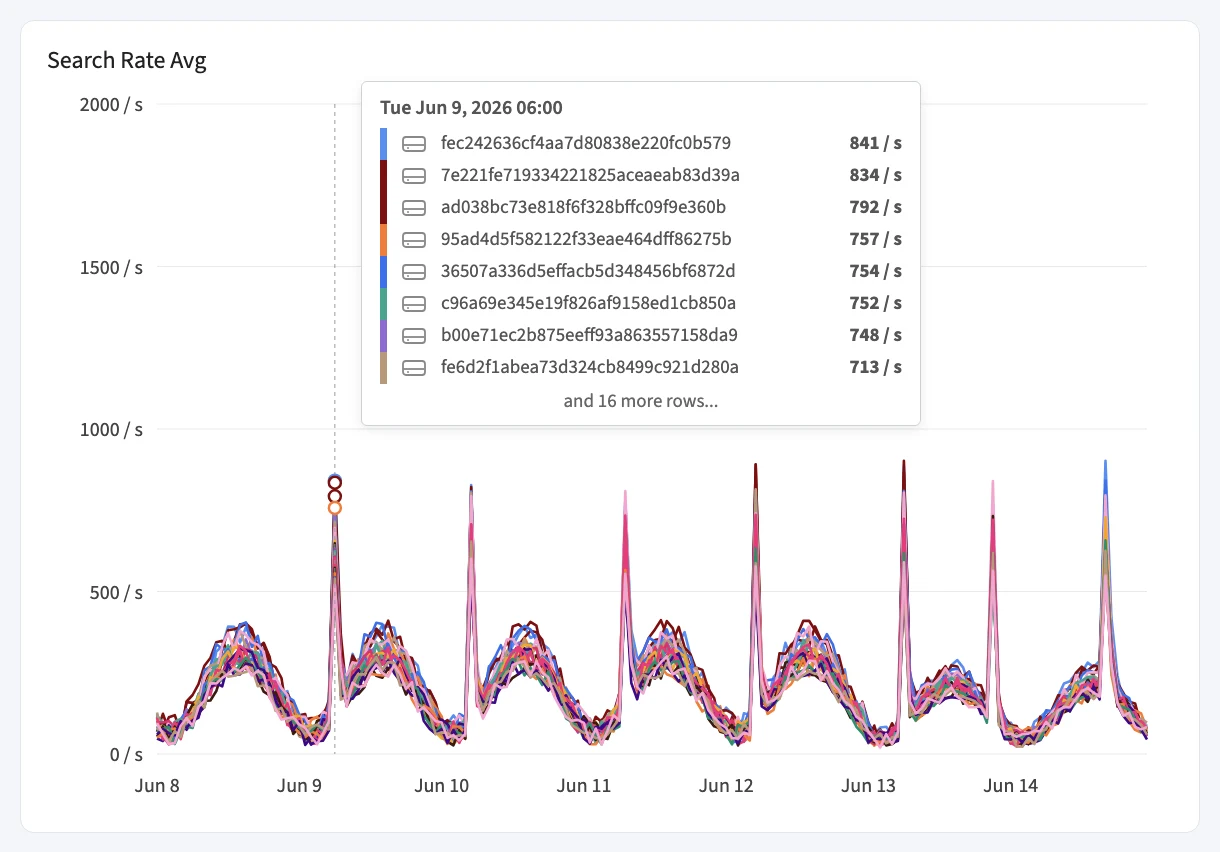
This chart tells us two things. First, the spikes are real and significant: every node more than doubles its normal search rate. Second, all nodes spike together and by roughly the same amount. That rules out a hot node or an unbalanced shard allocation, the usual suspects when a single node misbehaves. Adding nodes or rebalancing shards wouldn't address the cause.
What the node view can't tell us in this case is why. To answer that, we switch to the same metric broken down by index. NeverBlink groups indices by index pattern, so all the indices of a pattern such as products-8653fae0-b241-badf-ecc3-7f0726a9cd98 show up as a single line instead of dozens:
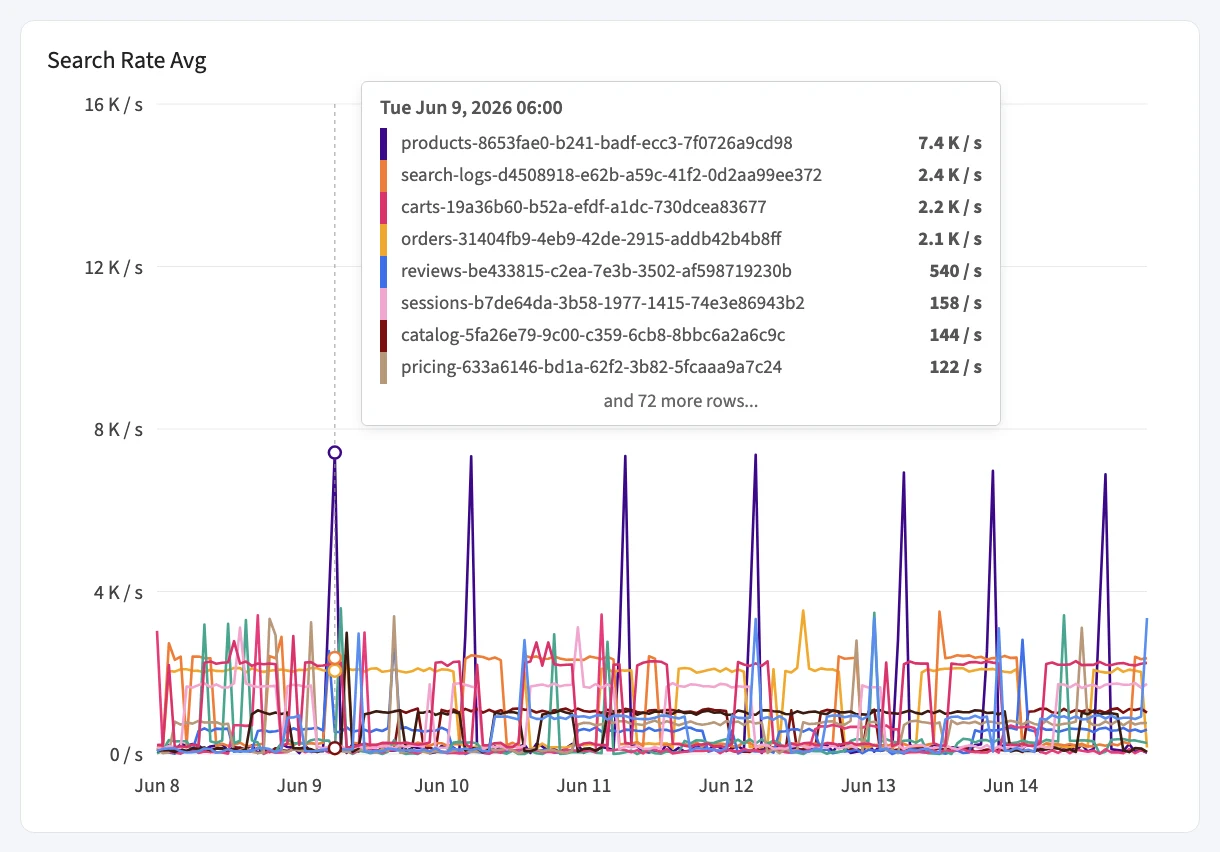
From the chart, it looks like one index pattern lines up with every node spike and runs at several times the search rate of any other pattern in the cluster.
This is a common investigation path when node-level search rate spikes: pivot to the index pattern graphs, find the pattern that lines up with the spike, and investigate the workload behind it. Once you know which set of indices is being hit, you know whose application, tenant or integration to look at, and the conversation moves from "the cluster is slow" to a different one. One can investigate the usage pattern to determine whether the query load can be reduced or spaced out across a longer time period, or decide to increase replicas for the indices to spread out the load between nodes.
"Can I scale down my cluster?"
Over-provisioned nodes are a common source of unnecessary cost. This can happen on data nodes, as well as master nodes (also referred to as cluster manager nodes). Master nodes manage tasks on the cluster, keep the cluster state and - assuming they're created as dedicated masters - don't hold data or serve searches, so their resource needs are very different from data nodes.
Here are the Machine Stats for the three dedicated masters on a single cluster:
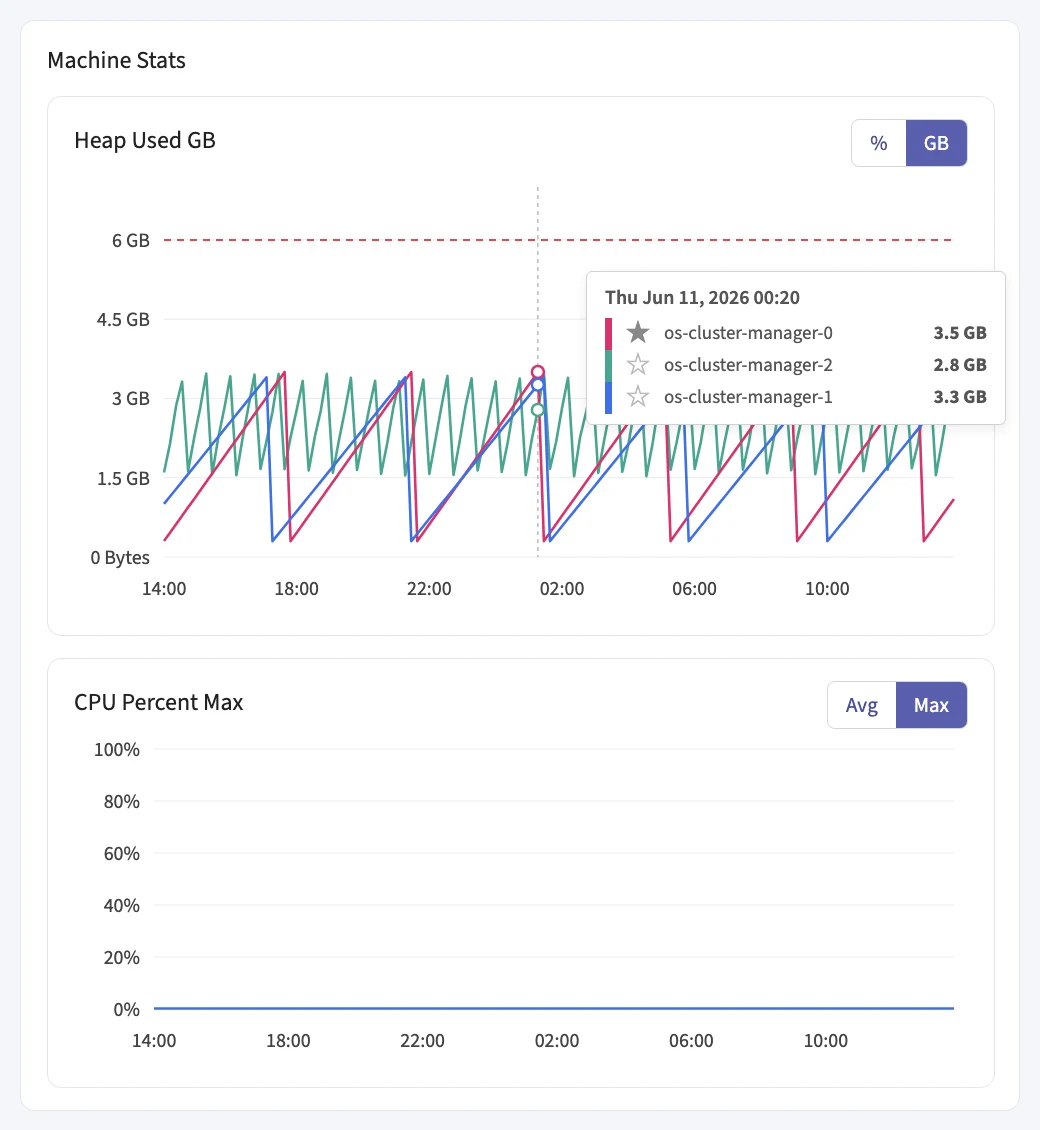
The dashed line marks the heap each node is configured with: 6 GB. Heap usage follows a healthy sawtooth pattern: it climbs as garbage accumulates and drops after each collection. Even the elected master (the starred node) peaks at around 3.5 GB, and the low points after each collection, which reflect the real working set, are under 1 GB. On the right, CPU max sits near zero for the whole day. This cluster is containerized, which NeverBlink detects, so CPU percent is the better signal here than load average (more on this below). It's worth mentioning that the flat CPU signal here could be regarded as suspicious, so looking at a wider time range to see whether it produces non-zero values is a good practice in such cases.
Now look at what those nodes are provisioned with:
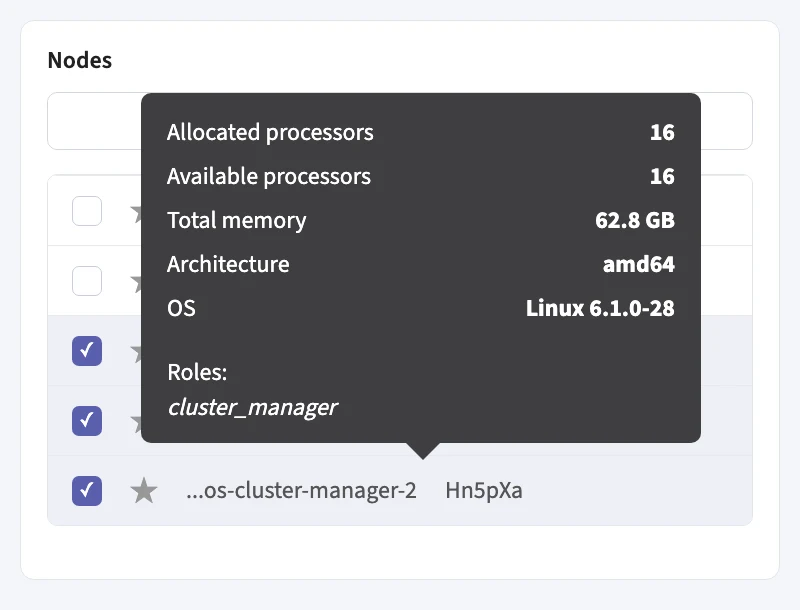
16 processors and over 60 GB of memory, where the observed use is far below that. The 6 GB heap is less than a tenth of the node's 62.8 GB, and the rest does little for a master node. Moving the master nodes to a much smaller instance type is one of the safest savings available. When you do it:
- Size by the active master. The elected master does the actual work, so base the new size on its resource usage, and leave comfortable headroom above it for both heap and CPU. Identical downsizing should be done for the non-elected nodes as well.
- Size memory to the heap. Keep the heap at no more than half of the node's memory, the usual OpenSearch guideline, and don't provision much beyond that. Here, a node with 12 to 16 GB of memory is enough for the existing 6 GB heap.
- Keep three dedicated masters. That's what preserves quorum when one of them is replaced or restarted.
- Replace them one at a time, and confirm the cluster is green before moving to the next.
"How can I reduce my shard count?"
A high shard count costs heap on every node, slows down cluster state updates and makes recovery slower. Reducing it usually starts with finding shards that shouldn't exist in the first place.
In this cluster, the first hint came from the index list. NeverBlink groups system and plugin indices under Internal indices, and that group showed a suspiciously large number: 587 indices. Opening it revealed where they came from:
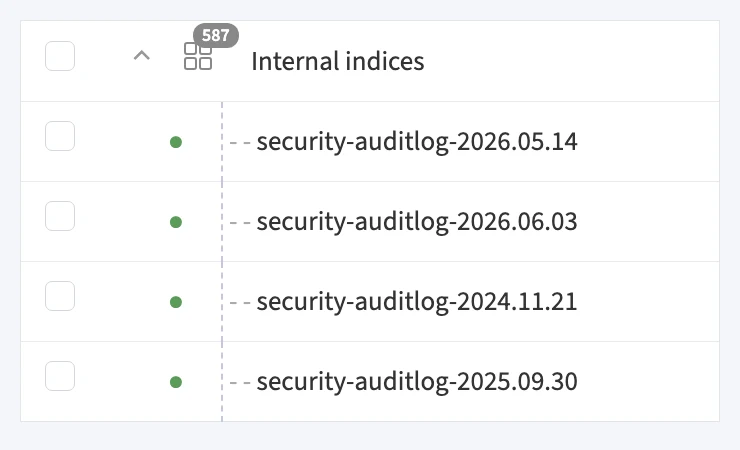
Almost all of them are security-auditlog-YYYY.MM.DD indices. The OpenSearch Security plugin writes audit events to a new index every day by default, and nothing deletes them. This cluster had daily audit log indices going back more than a year and a half, each with at least one primary shard plus replicas. That is well over a thousand shards holding mostly cold, rarely read audit data.
Two changes fix this, and NeverBlink recommends both:
1. Delete the audit log indices you no longer need. Check your audit retention requirements first, then delete everything older than that. To keep it from happening again, attach an Index State Management policy that deletes audit log indices once they pass the retention period:
PUT _plugins/_ism/policies/auditlog-retention
{
  "policy": {
    "description": "Delete security audit log indices after 90 days",
    "default_state": "hot",
    "states": [
      {
        "name": "hot",
        "actions": [],
        "transitions": [{ "state_name": "delete", "conditions": { "min_index_age": "90d" } }]
      },
      {
        "name": "delete",
        "actions": [{ "delete": {} }],
        "transitions": []
      }
    ],
    "ism_template": { "index_patterns": ["security-auditlog-*"], "priority": 100 }
  }
}
The ism_template only applies to indices created after the policy exists. To attach it to the audit log indices you already have, use POST _plugins/_ism/add/security-auditlog-* with {"policy_id": "auditlog-retention"}.
2. Switch to monthly audit log indices. Daily indices are far more granular than audit data needs. Changing the index name pattern in opensearch.yml on every node, followed by a rolling restart, creates about thirty times fewer audit log indices:
plugins.security.audit.config.index: "'security-auditlog-'YYYY.MM"
With monthly indices and a sensible retention period, hundreds of audit log indices shrink to a handful, without losing any audit data you're required to keep.
Reading CPU Correctly on Containerized Clusters
The master node investigation above relied on CPU percent rather than load average for a containerized cluster. This idea is exclusively built into NeverBlink monitoring, based on our experience with monitoring OpenSearch clusters.
Load average vs. CPU usage on containerized clusters. On a containerized node, load average describes the whole host: neighboring containers, processes waiting on I/O, and everything else scheduled on that machine. A node can report a high load average while the OpenSearch process inside it uses only a small share of its CPU, or the other way around. NeverBlink detects containerized clusters automatically, and on those it tracks node load by the OpenSearch process's CPU usage instead of load average, both in the node displays and in alerts (though the host load average metric is still available for viewing). That way a busy node and an idle node on the same crowded host look different, and alerts fire on the load OpenSearch itself is producing, not on its neighbors.
CPU percent on earlier OpenSearch 3.x versions. Some earlier OpenSearch 3.x versions don't calculate CPU percent correctly, and report process.cpu.percent as -1 in node stats on every sample. NeverBlink calculates the percent using the available data. Nodes on these versions get a real CPU percent in charts and alerts, just like any other node, as long as the NeverBlink agent is up to date.
Answers, Not Just Graphs
None of these findings required new instrumentation beyond the NeverBlink agent. The search rates, heap and CPU usage, node specs and index lists were already available. What made the difference was looking at them in the right order: from node to index pattern, from usage to provisioning, from a suspicious count to the indices behind it. NeverBlink also does the work of reading each metric the right way for the cluster: on containerized clusters, that means the OpenSearch process's CPU usage instead of the host's load average, with CPU percent calculated even on the OpenSearch versions that report it as broken.
That is what NeverBlink is built for: turning the metrics your cluster already produces into concrete answers and recommendations, so you spend your time fixing problems instead of hunting for them. The investigations above are only part of it: NeverBlink also alerts you when something goes wrong in your cluster, and allows you to run AI-based root-cause analysis on those alerts, so you know not just that something broke but why. Get started with NeverBlink and see what your OpenSearch cluster has been hiding.